
A startup founder says:
“Our ideal customer is a growing company with 50–200 employees.”
The product designer asks:
“Great. But who inside that company will actually use the app every day?”
Silence.
This is where many digital products begin going in the wrong direction.
A company may have a well-defined Ideal Customer Profile (ICP) for sales and marketing but still have only a vague understanding of its actual users.
And those are not necessarily the same people.
Your ideal customer might be a mid-sized logistics company.
The buyer could be its operations director.
The person approving the contract might be the CFO.
But the people using your application every day might be dispatchers, warehouse coordinators and drivers.
If the product team designs mainly around the company buying the software instead of the people operating it, the result can be technically impressive but frustrating to use.
That is why understanding Target User vs Ideal Customer Profile should happen before serious wireframing, UI design or app development begins.
Nielsen Norman Group emphasizes that the UX audience consists of the people who actually interact with a product, and its research on personas recommends grounding user representations in real information about target audiences rather than treating everyone as one broad user group.
Let’s break down the difference—and more importantly, how product teams should use both.
What Is an Ideal Customer Profile?
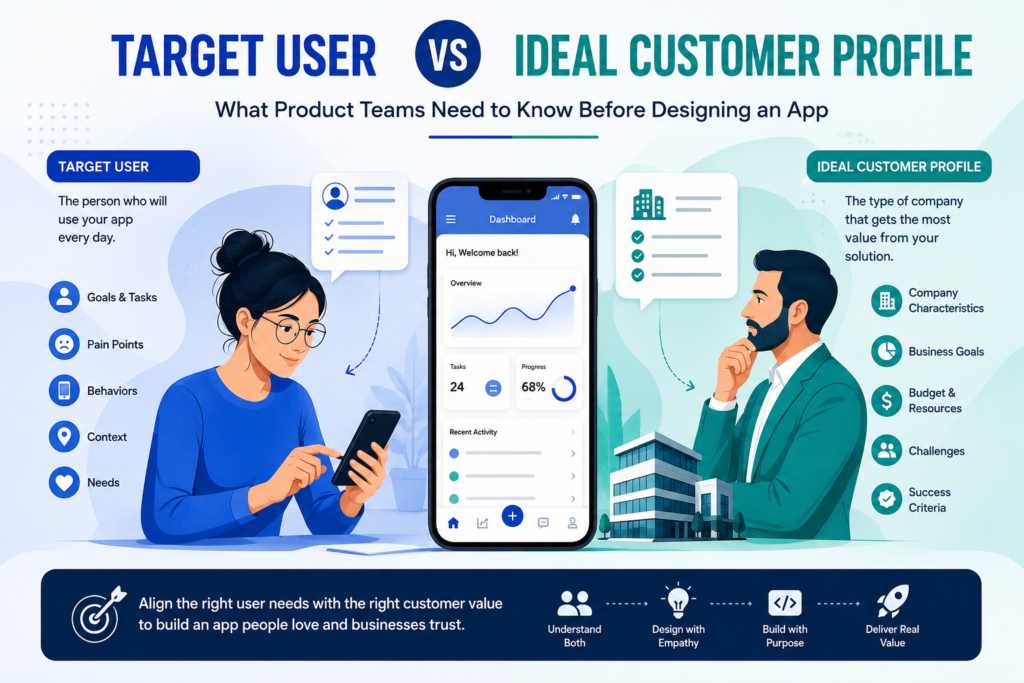
An Ideal Customer Profile, commonly called an ICP, describes the type of customer that is the strongest fit for your business.
In B2B businesses, an ICP often describes an organization rather than one specific individual.
For example, a SaaS company’s ICP might look like:
- Professional services businesses
- 50–500 employees
- Operating in North America
- Using multiple disconnected software tools
- Managing more than 100 client projects
- Experiencing reporting inefficiencies
- Able to invest in business software
- Having an internal operations team
This information is extremely useful.
It helps sales and marketing teams answer:
Which companies should we pursue?
An ICP can influence:
- Market positioning
- Sales targeting
- Account selection
- Pricing
- Marketing campaigns
- Lead qualification
- Product strategy
But an ICP usually does not contain enough information to design a usable application.
Knowing that your ideal customer has 150 employees tells a designer very little about what should happen after someone taps “Create Project.”
What Is a Target User?
A target user is a person or group of people who will actually interact with your product.
Target-user research goes deeper into behavior.
A product team might want to understand:
- What is this person trying to accomplish?
- What does their working day look like?
- What frustrates them?
- Which tools do they currently use?
- How technically confident are they?
- What information do they need first?
- What steps do they repeat?
- What decisions do they make?
- Where do errors happen?
- What would make them abandon the app?
This is much closer to the information designers and developers need.
Nielsen Norman Group describes personas as representations built from real information about target audiences so teams can design with actual customers in mind. It also warns against assuming that “everyone” is the user, even for products with broad audiences.
Your ICP helps identify the market opportunity.
Your target-user research helps shape the product experience.
Target User vs Ideal Customer Profile: The Simple Difference
Here is the easiest way to separate them:
| Question | Ideal Customer Profile | Target User |
|---|---|---|
| Who are we selling to? | Primary focus | Sometimes |
| Who uses the product? | Not necessarily | Primary focus |
| Company characteristics | Important | Usually secondary |
| Daily behavior | Limited detail | Critical |
| Goals and tasks | Broad | Detailed |
| Pain points | Business-level | User-level |
| Buying capacity | Important | Often irrelevant |
| UX decisions | Indirect influence | Direct influence |
| Sales targeting | Very important | Sometimes important |
| Feature prioritization | Useful | Essential |
The two should work together.
The mistake is using one as a substitute for the other.
The Buyer, Customer and User May Be Three Different People
This is especially important in B2B software.
Consider an employee training platform.
The Customer
A 500-person professional services company.
The Economic Buyer
The HR Director.
The User
Employees taking training courses.
Another User
Managers monitoring completion.
Administrator
An HR coordinator creating accounts and reports.
They all interact with the same product differently.
The HR Director may care about:
- Cost
- Compliance
- Reporting
- Employee adoption
- ROI
An employee may care about:
- Easy login
- Short learning modules
- Progress tracking
- Mobile access
An HR administrator may care about:
- Bulk uploads
- Permissions
- Reporting
- Account management
Design only for the person signing the contract and you can easily build the wrong experience for the person using the system five days a week.
Why Product Teams Confuse ICPs With Target Users
It often happens because businesses begin with sales.
Sales teams know which industries convert.
Marketing knows which company sizes respond.
Leadership knows which accounts are most profitable.
So when designers ask:
“Who are we building this for?”
someone shares the ICP.
For example:
“Our target customer is a US healthcare company with 100–1,000 employees.”
That sounds specific.
From a UX perspective, it is still extremely broad.
Who is logging in?
A receptionist?
A clinician?
An administrator?
An IT manager?
A department head?
Do they use the software every hour or once a month?
Desktop or mobile?
Sitting at a desk or moving between locations?
High technical confidence or almost none?
Those answers can completely change the product design.
What Happens When You Design an App Around the ICP Alone?
Several product problems can appear.
1. You Build Features Buyers Request but Users Avoid
Buyers often request features that sound valuable during a sales conversation.
Users experience those features differently.
An executive may request an advanced dashboard containing 25 metrics.
The employee using it might only need three numbers to make today’s decision.
More features do not automatically create more value.
Atlassian notes that personas can give teams a consistent picture of their audience and help discussions about product features remain grounded in customer needs rather than internal assumptions.
2. Your User Journey Reflects the Business Structure Instead of User Behavior
Organizations naturally think in departments.
Customers do not necessarily think that way.
Your internal team may structure an app as:
Accounts → Projects → Activities → Reports → Documentation
The user may think:
“I need to see what needs my approval today.”
That is a very different starting point.
Product architecture should make sense to the person completing the task—not just the company building the software.
3. Onboarding Becomes Too Complicated
Teams often design onboarding around everything they want to know about a customer.
Users simply want to reach value quickly.
Imagine downloading an app and immediately receiving:
- 12 setup questions
- Profile configuration
- Company details
- Notification settings
- Integration requests
- Preference selection
- Team invitations
before seeing the feature that made you install it.
Some information may be necessary.
But product teams should ask:
Does the user need to complete this now—or does our business simply want the data now?
That distinction can transform onboarding.
4. Mobile and Desktop Priorities Can Be Wrong
Suppose your ICP is construction companies.
A product team might naturally imagine office managers working from laptops.
But actual users could include supervisors moving around construction sites.
Now the experience changes.
They may need:
- Large tap targets
- Quick photo uploads
- Simple navigation
- Fast task entry
- Limited typing
- Reliable mobile functionality
Target-user context changes design requirements.
ICP vs User Persona: Are They the Same Thing?
No.
They can complement each other, but they answer different questions.
An ICP usually defines the customer type with the strongest commercial fit.
A user persona turns research about a particular user group into a memorable representation of its behaviors, goals, context and needs.
Nielsen Norman Group describes personas as tools that help make important user groups tangible throughout a project’s lifecycle.
For example:
ICP
Growing Home-Service Company
- 20–100 employees
- Multiple field teams
- Growing customer base
- Manual scheduling processes
- Needs better operational visibility
User Persona
Sarah – Scheduling Coordinator
- Coordinates 25 technicians
- Works primarily on desktop
- Handles frequent schedule changes
- Receives customer calls throughout the day
- Needs to see technician availability immediately
- Gets frustrated by switching between multiple systems
- Values speed more than advanced customization
The ICP tells you why this business could buy.
Sarah tells you what the software needs to feel like.
Start With Real Research, Not a Fictional Persona Workshop
One dangerous approach is gathering the product team in a room and inventing users.
Someone says:
“Our user is probably 28–40, tech-savvy and likes productivity apps.”
Another person adds:
“Let’s call him Product Manager Mike.”
Now Mike has:
- A stock photo
- An age
- A salary
- A favorite coffee
- Three personality traits
But nobody has interviewed a real customer.
That is decoration—not research.
Personas become useful when they summarize meaningful patterns discovered through research.
Atlassian recommends building personas with qualitative and quantitative inputs such as customer interviews, surveys, analytics and information from teams that interact with customers.
Instead of asking:
“What do we think users want?”
ask:
“What evidence do we have?”
8 Questions to Answer Before Designing Your App
Before your team starts high-fidelity UI design, answer these questions for each important user group.
1. Who Actually Uses the Product?
Be precise.
Not:
Small business employees.
Better:
Operations managers at 20–100-person logistics companies who coordinate daily deliveries.
2. What Is Their Most Important Job?
What are they opening your app to accomplish?
If you cannot explain that in one sentence, feature prioritization will become difficult.
3. What Are They Doing Today?
Your competitor is not always another software company.
It may be:
- Excel
- Paper
- Phone calls
- Google Docs
- An internal spreadsheet
- A human assistant
Understanding the current workaround exposes the real product opportunity.
4. What Is Painful About the Current Process?
“Needs better efficiency” is too vague.
Dig deeper.
Perhaps a manager manually copies order information from emails into spreadsheets every morning.
That is something a product team can design around.
5. Where Does the User Work?
Context changes UX.
Are users:
- At a desk?
- Driving?
- On a warehouse floor?
- Meeting clients?
- Using gloves?
- Working under time pressure?
- Frequently interrupted?
- Using poor internet connections?
App design does not happen in a vacuum.
6. How Often Will They Use the App?
Daily-use software can justify learning more complex workflows.
An application used once every three months may need far more obvious navigation.
Frequency changes design decisions.
7. What Does Success Look Like for Them?
Not what success means to your company.
What does success mean to the user?
Maybe:
- Finishing reports before 5 PM
- Finding information in seconds
- Reducing customer complaints
- Avoiding scheduling conflicts
- Closing more sales
- Completing compliance tasks without errors
Those outcomes should influence the product.
8. What Would Stop Them From Using It?
This question is often more valuable than:
“What features would you like?”
Barriers might include:
- Too much data entry
- Slow performance
- Confusing navigation
- Privacy concerns
- Complicated onboarding
- Missing integrations
- Too many notifications
- Lack of mobile access
These are adoption problems waiting to happen.
Map Every Important User Before Building Features
For multi-user applications, create a simple user map.
Imagine a B2B project management platform.
You might have:
Business Owner
Wants visibility into project profitability.
Project Manager
Needs planning, assignments and deadlines.
Team Member
Needs to know what to do next.
Client
Needs progress updates and approvals.
Administrator
Needs access control and system configuration.
One feature can have completely different meanings for each group.
Consider a dashboard.
The business owner wants financial visibility.
The project manager wants delivery risk.
The employee wants today’s tasks.
The client wants progress.
One generic dashboard for “the customer” will probably satisfy none of them particularly well.
Which User Should You Design for First?
You cannot optimize version one equally for every possible user.
This is where product strategy becomes important.
Identify your primary user.
Ask:
Whose successful experience is essential for the product to deliver its core value?
Then identify:
- Primary users
- Secondary users
- Buyers
- Administrators
- Influencers
This does not mean ignoring secondary users.
It means creating priorities.
When everything is equally important, product scope grows very quickly.
Connect Target-User Research to MVP Development
Target-user clarity is especially important before building an MVP.
An MVP is supposed to validate an important product assumption.
But you cannot validate that assumption properly if you test the product with the wrong users.
Suppose you build software for restaurant inventory management.
Your ICP is:
Independent restaurant groups with 3–15 locations.
Good.
But who owns the inventory process?
The owner?
General manager?
Kitchen manager?
Purchasing manager?
Different users can expose completely different requirements.
Before deciding the MVP feature list, understand which user’s problem must be solved first.
Then build around that workflow.
How Target-User Research Improves Wireframes and Prototypes
This is where research begins turning into visible product decisions.
Suppose interviews reveal that users repeatedly need to:
- Check urgent orders.
- Identify delays.
- Contact suppliers.
- Update customers.
Now the first dashboard can be designed around those actions.
Without research, the design team might prioritize:
- Company news
- Total order count
- Profile settings
- Generic activity feeds
All perfectly valid features.
Just not necessarily the most useful ones.
Atlassian’s product guidance recommends clearly defining the problem and value proposition for target users and validating a product hypothesis before heavy investment in building.
That is exactly where target-user research earns its value.
Don’t Ignore the ICP Either
After reading this, it would be easy to conclude that product teams should forget the Ideal Customer Profile and focus only on users.
That would also be a mistake.
A product must satisfy both user value and business viability.
Imagine users love your product, but the companies they work for:
- Cannot afford it
- Have no budget authority
- Cannot integrate it
- Face regulatory restrictions
- Do not experience enough business value to purchase it
You may have built a pleasant product without a viable market.
This is why successful product strategy connects three levels:
Market
Which businesses have the problem and ability to buy?
Buyer
Who makes or influences the purchasing decision?
User
Who experiences the product and receives day-to-day value?
Your ICP helps clarify the first.
Buyer research clarifies the second.
Target-user research clarifies the third.
You need all three.
A Practical Framework for Product Teams
Before app design begins, create a one-page map containing:
Ideal Customer Profile
Define:
- Industry
- Company size
- Market
- Business model
- Core business problem
- Budget or buying capacity
- Technology environment
Buyer
Define:
- Job title
- Business goals
- Purchasing concerns
- Decision criteria
- Risks
- ROI expectations
Primary User
Define:
- Role
- Core tasks
- Goals
- Pain points
- Current workflow
- Usage environment
- Technical confidence
- Success criteria
Secondary Users
Define anyone else who interacts with the platform and how their needs differ.
This simple exercise can prevent months of product confusion.
Final Thoughts: Know Who Buys—and Who Uses
The Target User vs Ideal Customer Profile discussion should not be treated as a choice between two strategies.
You need both.
Your Ideal Customer Profile helps answer:
Who is commercially worth serving?
Your target-user research helps answer:
Whose problem are we actually designing for?
When these two perspectives are aligned, product teams can make much better decisions about:
- Features
- User journeys
- Navigation
- Mobile vs desktop priorities
- MVP scope
- Onboarding
- Integrations
- Pricing
- Product roadmap
And most importantly, they reduce the risk of building an app that looks impressive in a sales demonstration but becomes frustrating when real people have to use it every day.
Before opening Figma.
Before finalizing the backlog.
Before hiring a full development team.
Know the business buying your product—and know the human being who will depend on it.
Need help identifying target users before designing or developing your app? Work with our product strategy and user research team to validate the right audience, define real user needs and build your product around evidence instead of assumptions.