
Your product team has spent weeks redesigning an onboarding flow.
The new version looks cleaner.
Navigation is simpler.
The prototype feels faster.
Five people test it and complete every task without difficulty.
The team celebrates.
Development begins.
Then the feature reaches customers.
Operations managers cannot understand the terminology.
Administrators struggle with permissions.
Employees cannot complete workflows because their accounts lack the access your test participants had.
Enterprise customers start opening support tickets for issues nobody found during usability testing.
The problem was not necessarily the prototype.
It was the people you tested it with.
This is one of the biggest risks in B2B SaaS usability testing.
A usability test can be professionally moderated, carefully documented and supported by impressive-looking metrics, yet still produce misleading conclusions when the participants do not represent the real users of the product.
Government user research guidance makes the principle very clear: participants should be actual or likely users of the service, and research teams should identify the different types of people who need to use it before recruiting participants.
For B2B SaaS, that requirement becomes particularly important because “the customer” is rarely one person.
The person who purchases the software may never use it every day.
The administrator may use completely different features from an employee.
A department manager may approve actions that individual contributors initiate.
If those roles are mixed together during research, you can end up designing around feedback that looks valid but does not represent real product behavior.
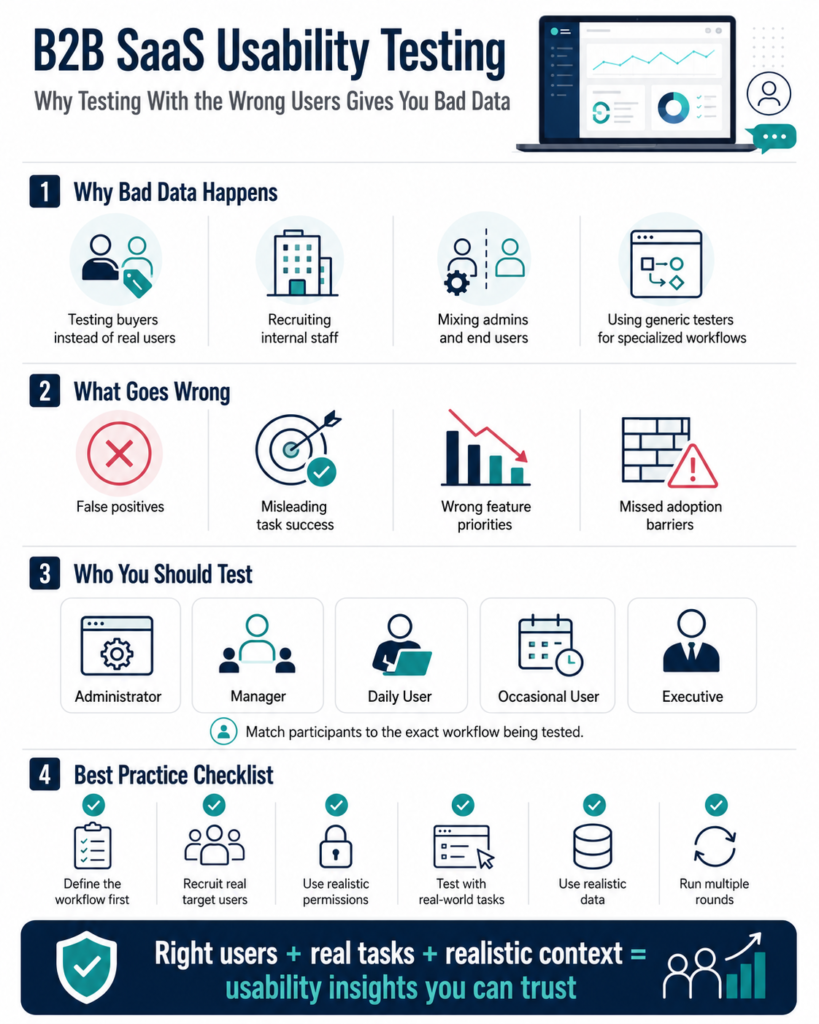
Why B2B SaaS Usability Testing Is Different
Consumer apps often have relatively direct relationships between the buyer and the user.
Someone wants a food delivery app.
They download it.
They order food.
They experience the product themselves.
B2B SaaS can be much more complicated.
Consider a project management platform sold to a 500-person company.
The buying process might involve:
- Chief Operating Officer
- IT manager
- Procurement
- Finance
- Security team
The product itself may be used by:
- System administrators
- Department managers
- Project managers
- Team members
- Contractors
- Executives
These people do not have the same objectives.
They do not have the same permissions.
They do not even necessarily understand the product using the same language.
ZA Technologies’ work around identifying target users highlights this issue specifically for B2B SaaS, where buying committees, economic buyers, end users and influencers can all play different roles in product adoption.
That means a B2B usability test cannot begin with:
“Let’s find five people who work in business.”
It needs to begin with:
“Which specific user are we testing this workflow for?”
The Wrong Participant Can Give You the Right Answer to the Wrong Question
Suppose you are building expense management software.
You want to test a new expense approval workflow.
You recruit five business owners because they are easy to reach.
All five understand the dashboard.
They successfully approve expenses.
Your completion rate is 100%.
The feature looks ready.
But in your customers’ organizations, business owners do not normally approve individual expenses.
Department managers do.
Those managers may have:
- Different permissions
- More expenses to process
- Different reporting requirements
- Less financial expertise
- Stricter approval rules
- Different device habits
You successfully tested whether business owners could operate the feature.
That was never the real product question.
The correct question was:
Can department managers efficiently review and approve expenses under the conditions they experience at work?
Usability data is only meaningful in relation to the user and task it represents.
Mistake 1: Testing With Employees From Your Own Company
This is convenient.
Your product designer walks over to the marketing team and says:
“Can you try this new dashboard?”
Ten minutes later, you have feedback.
The problem is familiarity.
Internal employees may already understand:
- Product terminology
- Navigation logic
- Feature history
- Company strategy
- How the product is supposed to work
Real customers do not have that advantage.
GOV.UK specifically advises teams to avoid using their own staff to research public-facing services because internal knowledge and experience can cause them to use a product differently from real users.
The same logic applies strongly to SaaS products.
Your developer knows what “Workspace Configuration” means because the team debated that label for two weeks.
A new customer may have no idea.
If the internal employee completes the task without hesitation, the usability problem remains invisible.
Mistake 2: Recruiting the Buyer Instead of the User
Imagine you sell workforce scheduling software.
The HR director chooses the platform.
But frontline supervisors create schedules every day.
If you only test with HR directors, you may optimize for:
- Reporting
- Compliance
- Analytics
- Management dashboards
Meanwhile, frontline supervisors struggle with:
- Shift changes
- Staff availability
- Replacements
- Mobile access
- Last-minute schedule conflicts
The buyer helps you understand why an organization purchases the product.
The user helps you understand whether the product works.
Both matter.
They answer different questions.
This is why product teams should separate:
Buyer research
from
usability testing with end users.
If your team is still mixing the commercial customer with the actual product user, ZA’s target-user research framework is a useful starting point because it separates decision makers, users and other stakeholders before design decisions are made.
Mistake 3: Testing With People Who Have the Right Job Title but the Wrong Experience
Job titles are useful screening criteria.
They are not enough.
Two people may both be called “Operations Manager.”
One works at a 15-person startup.
The other manages operations across 25 warehouse locations.
Their workflows may have almost nothing in common.
Consider questions such as:
- How large is their organization?
- How frequently do they perform this task?
- Which software do they currently use?
- How many people do they manage?
- What decisions are they responsible for?
- Which approvals do they need?
- How technically experienced are they?
Research recruitment criteria should reflect the behavior and experience relevant to the product question, not simply demographic labels or broad professional categories.
GOV.UK recommends defining recruitment criteria based on specific target groups, relevant experiences and the situations participants actually encounter.
Mistake 4: Testing Administrators and End Users as One Group
This creates particularly misleading SaaS research.
Administrators often know considerably more about a platform than ordinary users.
They may:
- Configure accounts
- Set permissions
- Manage integrations
- Create workflows
- Troubleshoot problems
- Receive product training
An ordinary employee may only log in twice a week to complete one task.
Now imagine testing navigation.
Your administrators find every feature quickly.
The design team concludes:
Navigation is clear.
But the ordinary employee may not know:
- What your terminology means
- Which menu contains the task
- Which permissions affect what they see
- What happens after submission
Different roles require different test sessions.
Do not average them together and call the result “user feedback.”
Mistake 5: Recruiting Only Power Users
Power users are valuable research participants.
They can explain sophisticated workflows and identify advanced product gaps.
They are also dangerous if they become your only research group.
A power user may:
- Know shortcuts
- Understand unusual terminology
- Remember hidden menu locations
- Configure the software extensively
- Work around UX problems automatically
They may no longer notice problems that stop new users.
Imagine asking someone who has used your software for four years:
“Can you find the reporting page?”
They reach it in two seconds.
A new account manager may spend two minutes searching.
Both results are valid.
They describe different stages of the customer journey.
Recruit based on the research question.
If you are testing onboarding, new or prospective users may matter more.
If you are redesigning an advanced reporting system, experienced users may be essential.
Mistake 6: Using Generic Testing Panels for Highly Specialized SaaS
Participant panels can make recruitment faster.
But speed should not override relevance.
Suppose your SaaS product helps insurance underwriters evaluate commercial risk.
Recruiting five people who have used “business software” does not make them appropriate participants.
They may understand buttons and forms.
They cannot tell you whether:
- Your terminology matches insurance workflows
- The information hierarchy supports underwriting decisions
- Important risk data is missing
- The sequence of steps reflects real work
- Industry-specific actions make sense
Specialized B2B software often contains domain knowledge.
The participant needs enough relevant experience for the task to be realistic.
Otherwise you may end up measuring interface simplicity while completely missing workflow accuracy.
What Bad Participant Recruitment Does to Your Data
Poor recruitment does not simply produce weaker feedback.
It can distort your conclusions.
False Positive
Participants complete the workflow easily.
Your team concludes the experience is good.
Real users later struggle.
False Negative
Participants find the workflow confusing because they lack the domain expertise normal users would have.
Your team redesigns something that was not actually broken.
Wrong Feature Priorities
Participants ask for functionality that matters to them but not to your core users.
Those requests enter the roadmap.
Misleading Task Completion Rates
A dashboard says:
90% task success.
But the participants were not representative.
The number looks scientific while describing the wrong population.
Missed Adoption Barriers
Real users may face:
- Permissions
- Organizational policies
- Legacy systems
- Specific terminology
- Approval chains
Generic participants never encounter those realities.
Bad recruitment can make high-quality usability testing produce bad product decisions.
Start With the Research Question, Not the Participant List
Before recruiting anyone, define exactly what you need to learn.
Not:
“We need feedback on the new dashboard.”
Better:
“Can operations managers at multi-location retail companies identify stores with inventory problems and take the appropriate action without training?”
Now recruitment becomes easier.
You know you need people who:
- Work in operations
- Manage multiple locations
- Deal with inventory
- Perform similar decisions regularly
GOV.UK recommends agreeing on research questions, user types and the parts of the service being evaluated before recruiting usability testing participants.
The research question determines the participant.
Not the other way around.
Build a B2B SaaS Participant Screener
A good screener protects your research from irrelevant participants.
Suppose you are testing procurement SaaS.
Your screener might ask:
What is your current role?
How often are you involved in supplier selection?
How many suppliers do you typically manage?
Which tools do you currently use?
Are you responsible for approving purchases?
What size organization do you work for?
Have you used procurement software during the past 12 months?
The goal is not to collect personal trivia.
It is to confirm that the participant has experience relevant to the workflow you are testing.
Government recruitment guidance similarly recommends screening participants against predefined criteria representing the target user group.
Do Not Reveal the “Correct” Answer in Your Screener
You also need to watch for professional research participants.
If your screener says:
“We are looking for procurement managers who use Coupa at least three times a week. Do you qualify?”
you have essentially explained how someone can pass.
A better screener uses several indirect questions.
For example:
Which of these tasks are part of your current responsibilities?
Which software tools have you used during the last six months?
How frequently do you approve supplier purchases?
Now inconsistent answers become easier to identify.
How Many Users Should You Test?
There is no universal number that fits every research question.
For qualitative usability testing, you usually do not need hundreds of participants before learning something useful.
GOV.UK’s user research guidance says teams will typically work with around 4 to 8 participants per round for methods such as usability testing, interviews and contextual research, then conduct additional rounds as they learn and iterate.
ZA Technologies similarly describes usability programs that can begin with small groups of roughly 5 to 10 users and expand into larger ongoing programs when required.
The important phrase is:
per meaningful user group.
Testing:
- Two administrators
- Two managers
- Two employees
- Two executives
and combining them into one eight-person result may not give you a reliable view of any of those groups.
Sometimes fewer carefully selected participants from one relevant role teach you more than a large mixed sample.
Test Tasks Must Match Real Work
Recruiting the right participants is only half the job.
Then you need to give them realistic tasks.
Weak task:
“Find the analytics section.”
Realistic task:
“Your director asks why customer cancellations increased this month. Show us how you would investigate the issue.”
The second task creates context.
The user now has:
- A reason
- A goal
- A decision to make
GOV.UK usability guidance recommends tasks that are relevant and believable, have a clear goal and do not reveal how the participant should complete them.
This matters enormously in B2B products because workflows are often goal-based rather than screen-based.
People do not go to work thinking:
“Today I want to interact with a filter component.”
They think:
“I need to find the five overdue accounts before my 10 AM meeting.”
Design your test around that reality.
Test the Workflow, Not Just the Interface
B2B SaaS is often part of a much larger working process.
Suppose you test a CRM lead approval screen.
The interface itself might work perfectly.
But the real workflow involves:
- Sales representative enters lead.
- Manager reviews it.
- Finance checks contract value.
- Legal reviews specific deals.
- Lead becomes approved.
- Salesperson receives notification.
Testing only step two may miss the problem.
Perhaps users are confused because information from step one is incomplete.
Perhaps the manager cannot approve until Finance acts.
Perhaps notifications fail.
This is why usability research should consider end-to-end journeys where possible.
Government research guidance recommends considering all the ways users interact with a service, including related tools, support processes and offline steps, rather than evaluating a digital screen in isolation.
Permissions Can Completely Change a B2B Usability Test
This is one of the easiest problems to miss.
Your researcher tests using an administrator account.
Everything works.
Real users have restricted permissions.
Now imagine they attempt the same workflow.
A button is missing.
A menu contains fewer options.
Some information is hidden.
An action requires approval.
The real experience is completely different.
For B2B usability testing, create realistic account states for each role.
Test:
- Administrator
- Manager
- Standard user
- Read-only user
- External collaborator
when those roles matter to the feature.
Do not assume one account type represents everybody.
Use Realistic Data
A blank dashboard is not how many B2B users experience software.
Consider testing an analytics platform.
Your test environment contains:
Project A
Project B
User 1
User 2
A real customer sees:
- 143 projects
- 28 team members
- Six business units
- Thousands of transactions
- Years of reporting history
The interface may behave very differently under realistic information density.
Government moderated testing guidance notes that participants can often be more engaged and reveal more contextual issues when tasks use realistic or participant-relevant data rather than artificial examples.
For SaaS products, realistic test data can expose:
- Search problems
- Sorting limitations
- Dashboard overload
- Poor naming
- Information hierarchy issues
- Filtering problems
These may never appear in an empty prototype.
Observe Behavior Before Asking for Opinions
At the end of a test, a participant says:
“I really like this.”
Great.
But during the session they:
- Missed the main button
- Opened three incorrect menus
- Failed the task twice
- Needed moderator assistance
Which evidence matters more?
Behavior.
Usability testing is valuable because it lets you observe people trying to complete tasks.
GOV.UK defines moderated usability testing around watching participants perform tasks and using methods such as think-aloud to understand what they are doing, thinking and feeling.
Do not reduce the session to:
“Do you like the design?”
Watch:
- Task success
- Errors
- Hesitation
- Backtracking
- Time on task
- Requests for help
Then use participant comments to understand why those behaviors occurred.
Combine Quantitative and Qualitative Evidence
Suppose four out of six users fail a workflow.
That is useful quantitative evidence.
Now ask why.
Participant 1:
“I expected this under Billing.”
Participant 2:
“I thought that button would delete the account.”
Participant 3:
“I cannot tell which plan I’m currently on.”
Participant 4:
“I didn’t know I had permission to change this.”
Now you understand different causes behind the same failure.
ZA’s usability-testing approach similarly combines measures such as task success and time on task with qualitative observations and user feedback.
Numbers tell you the scale of the problem.
Observation helps explain the problem.
Segment Your Findings by Role
Do not write:
“Users struggled with reporting.”
Write:
“Four of five account managers could not create a client performance report without assistance. Administrators completed the same task successfully.”
That finding is much more useful.
Now the design team knows:
- Who struggles
- Which task is affected
- Whether the issue applies broadly
- Which role may need a different experience
B2B products frequently fail when teams average very different users into one imaginary persona.
Keep findings connected to the roles that produced them.
A Practical Recruitment Matrix
Before your next B2B SaaS usability test, create something like this:
| User Group | What They Do | What You Need to Test |
|---|---|---|
| Administrator | Configures platform | Setup, permissions, integrations |
| Manager | Reviews team activity | Reporting, approvals, oversight |
| Daily User | Completes core work | Main workflows, navigation, speed |
| Occasional User | Uses limited functions | Discoverability, clarity |
| Executive | Reviews outcomes | Dashboards, high-level reporting |
You may not need every group for every test.
Select the ones relevant to your research question.
When Should You Test Buyers?
Buyers absolutely belong in product research.
Just not automatically in every usability test.
Test buyers when you are evaluating things such as:
- Pricing presentation
- Product positioning
- Reporting expectations
- Procurement workflows
- Administrative requirements
- ROI communication
- Purchase-related onboarding
Test daily users when evaluating:
- Core tasks
- Navigation
- Forms
- Workflows
- Feature usability
- Productivity
Different questions require different people.
Accessibility Still Matters in Specialized B2B Software
It is easy to assume that enterprise users are homogeneous professionals using modern laptops in ideal conditions.
That is rarely a safe assumption.
User research should consider different access needs, assistive technologies and levels of digital confidence.
Government research guidance specifically recommends including users with varied access needs and avoiding research samples that represent only the easiest participants to recruit.
Accessibility should be part of real user testing, not simply a checklist completed after design.
Run Multiple Rounds Instead of Trying to Get Everything Right Once
Usability testing is most valuable as a repeated process.
Round 1 identifies major problems.
You redesign.
Round 2 tests the revised experience.
You find smaller issues.
You improve again.
Government user research guidance recommends repeated rounds and suggests that when more participants are needed, teams should often run additional rounds so findings from one cycle can improve the next.
This fits product development much better than one enormous usability study immediately before launch.
ZA’s usability-testing service is similarly structured around testing prototypes before development and continuing testing after launch rather than treating usability as a one-time validation exercise.
Connect Usability Findings to Product Decisions
The output of B2B SaaS usability testing should not be a 60-page PDF that nobody opens again.
Every finding should help the product team decide:
- What needs fixing?
- Who is affected?
- How severe is it?
- How frequently did it happen?
- Does it block a critical task?
- What should be tested next?
For example:
Finding
4 of 5 account managers failed to locate invoice approval.
Severity
High.
Business Impact
Could delay customer billing.
Recommendation
Expose pending approvals on the main dashboard.
Next Step
Prototype revised dashboard and retest with account managers.
Now usability testing becomes part of product development.
Not a research exercise sitting beside it.
If your team needs deeper evidence about workflows before testing an interface, ZA Technologies’ UX Research services focus on interviews, contextual inquiry, behavioral analysis and real target users before product decisions are finalized.
A Checklist Before Your Next B2B SaaS Usability Test
Before recruiting participants, confirm:
- We know exactly which workflow we are testing.
- We know which user role performs that workflow.
- Participants have relevant real-world experience.
- We are not relying only on internal staff.
- Buyers and daily users have not been mixed accidentally.
- Account permissions match the real user role.
- Test data resembles realistic conditions.
- Tasks describe goals rather than interface instructions.
- We know what success looks like.
- We will record both task performance and qualitative observations.
- Findings will be segmented by user type.
- We have time to test again after making improvements.
If several of those answers are no, participant recruitment may be more important than another round of UI polishing.
Final Thoughts
B2B SaaS usability testing is not simply about putting a prototype in front of people.
It is about putting the right experience in front of the right people performing the right tasks under realistic conditions.
The wrong participant can make a difficult interface look easy.
They can make a perfectly reasonable workflow look confusing.
They can request features your real customers do not need.
And they can produce impressive usability metrics that tell your product team almost nothing about what will happen after launch.
Start by identifying the actual user.
Separate buyers, administrators, managers and everyday users.
Recruit based on relevant experience.
Give participants believable tasks.
Match permissions and test data to the real environment.
Observe behavior instead of relying on opinions.
Then test again after you improve the product.
The goal of usability testing is not to prove your design works.
It is to discover where it does not work before your customers discover it for you.
If your SaaS team needs usability evidence you can actually trust, ZA Technologies can recruit real target users, test critical workflows and turn observed usability problems into practical product improvements before they become adoption, support or retention issues.