
A SaaS team finishes a new release after three weeks of development.
Staging looks good.
Automated tests pass.
The deployment begins at 8:00 PM.
For the first ten minutes, everything seems normal.
Then support receives a message:
“Customers cannot complete checkout.”
Another arrives.
Then another.
Engineering discovers that the new release works for most users, but a database change is breaking transactions for accounts created before a certain date.
Someone asks:
“Can we roll back?”
The room goes quiet.
The previous application version is still available, but nobody knows whether it can safely run against the modified database.
This is exactly why a release rollback plan should be created before deployment, not during an incident.
AWS classifies planning for unsuccessful changes as a high-priority operational practice. Its Well-Architected guidance recommends having a documented and tested plan to either return to a known good state or safely fix the problem in production.
A rollback plan is not pessimism.
It is part of professional software delivery.
What Is a Release Rollback Plan?
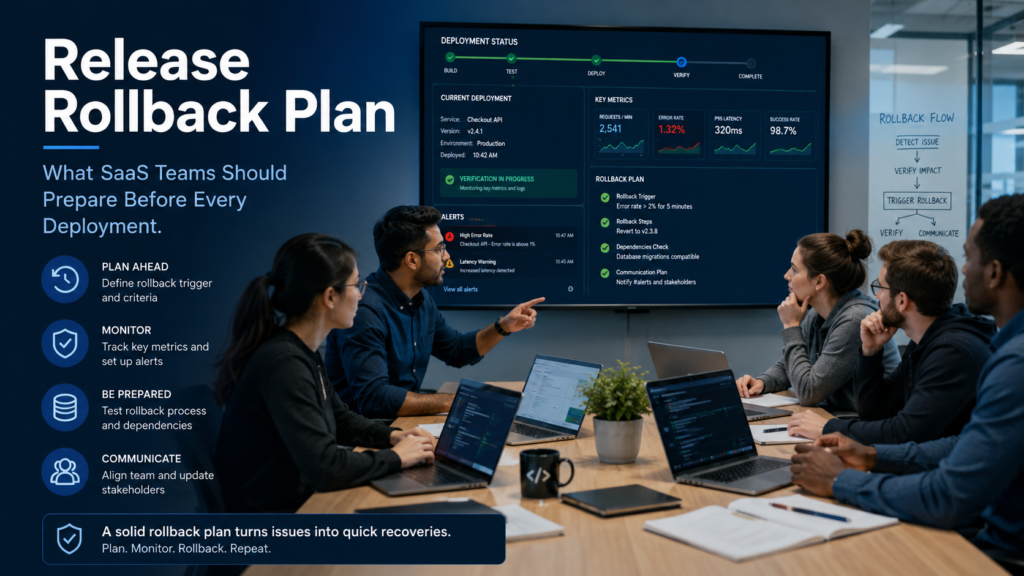
A release rollback plan defines what your team will do if a production deployment creates unacceptable problems.
At minimum, it should answer:
- What conditions trigger a rollback?
- Who can make the rollback decision?
- Which application version is the last known good version?
- How will application code be restored?
- What happens to database changes?
- Can a feature be disabled without reverting the whole release?
- How will traffic be redirected?
- What will the team monitor after rollback?
- How will customers and internal teams be informed?
The important word is prepared.
A rollback procedure that exists only in someone’s memory is not really a rollback plan.
Why “We Can Just Redeploy the Previous Version” Is Dangerous
For a very simple application, redeploying the previous build may work.
Modern SaaS platforms are rarely that simple.
A release might change:
- Application code
- Database schemas
- APIs
- Background jobs
- Infrastructure
- Environment variables
- Caching
- Authentication rules
- Third-party integrations
Rolling back one component while leaving the others unchanged can create a second incident.
For example, imagine version 4.3 adds a new database column and begins storing information in a new format.
If you immediately redeploy version 4.2, can the old code understand that new data?
If the answer is unknown, your rollback is not safe.
Martin Fowler’s guidance on blue-green deployment highlights this database problem specifically. Schema changes should ideally be structured so both old and new application versions can operate during the transition, giving teams a safe rollback point.
This is why rollback planning has to begin while the release is being designed.
1. Define Exactly What Should Trigger a Rollback
One of the worst moments during a production incident is debating whether the problem is serious enough to revert.
Your team sees error rates increasing.
Engineering wants five more minutes to investigate.
Support says customers are complaining.
Product wants to protect the launch.
Meanwhile, the impact grows.
Agree on rollback triggers before deployment.
Examples might include:
- Error rate rises above an agreed threshold
- Checkout success falls significantly
- Login failures increase
- Critical API requests begin failing
- Database errors appear
- Application latency crosses a dangerous threshold
- Crash rate increases after a mobile release
- A critical user journey becomes unavailable
- Security or privacy behavior is incorrect
Your exact thresholds should depend on your product.
A 1 percent increase in errors may be acceptable for one internal tool and unacceptable for a payment platform.
AWS recommends connecting automated rollback to predefined conditions so systems can return to a previous known good state quickly rather than relying entirely on manual intervention.
2. Identify the Last Known Good Version
Before deployment, everyone should know:
If this release fails, what exact version are we returning to?
Not:
“Probably last week’s build.”
Record:
- Application version
- Git commit or release tag
- Container image
- Infrastructure version
- Configuration state
- Dependency versions
- Database compatibility
Version information should also be visible in production logs or system metadata.
When an incident happens, engineers should not spend ten minutes trying to work out which build is running on which servers.
3. Treat Database Rollback as a Separate Problem
Code rollback is often easier than data rollback.
That distinction matters.
Suppose your release creates a new table.
That may be relatively safe.
Now suppose it:
- Renames an important column
- Deletes data
- Converts values
- Changes relationships
- Migrates millions of records
Reversing those changes may be much harder.
For risky schema changes, prefer patterns that preserve backward compatibility where possible.
For example:
Instead of removing an old database field immediately:
- Add the new field.
- Allow both application versions to work.
- Deploy the new application.
- Verify stability.
- Migrate remaining data.
- Remove the old field later.
This may feel slower.
It gives you something far more valuable during deployment: reversibility.
A rollback plan should clearly say whether the database needs to be rolled back, restored, migrated forward, or left unchanged.
4. Decide Whether You Need Rollback or Fix Forward
Not every production bug requires reverting the entire release.
Sometimes fixing forward is safer.
Imagine the release is healthy except for a typo in one notification template.
Rolling back an entire application could create more risk than correcting the template.
Now imagine checkout is completely broken.
That is a very different decision.
Your release policy should define when teams may fix forward and when rollback is mandatory.
AWS explicitly recommends documenting both approaches before production deployment.
A simple rule might be:
Rollback when core functionality, security, data integrity or revenue is at risk. Fix forward when the issue is isolated, understood and safer to correct than revert.
5. Use Feature Flags for Risky Features
Sometimes the safest rollback is not rolling back the application at all.
Feature flags let you deploy code while controlling whether a feature is available.
Suppose your release contains:
- Performance improvements
- Security updates
- A new AI recommendation feature
If the recommendation feature fails, you may be able to disable only that feature rather than remove the entire release.
AWS lists feature flags and traffic isolation among useful strategies for recovering from unsuccessful changes.
Feature flags are especially valuable for SaaS teams releasing functionality gradually.
You might enable a new feature for:
- Internal employees
- 1 percent of users
- Beta customers
- One customer segment
Then expand access after monitoring real behavior.
6. Reduce the Blast Radius With Canary Releases
A dangerous release strategy looks like this:
0% → 100% of customers
A safer strategy may look like:
1% → 10% → 25% → 50% → 100%
This is the idea behind a canary deployment.
A small group receives the new release first.
The team monitors:
- Error rate
- Latency
- CPU and memory
- API failures
- Business transactions
- Customer behavior
If problems appear, deployment stops before most customers are affected.
Google’s SRE guidance recommends canarying releases because real production traffic can reveal issues that staging and QA do not reproduce. Google also emphasizes monitoring error rates, latency and load during the canary stage.
For SaaS teams, reducing the number of customers exposed to a bad release can be just as important as making rollback faster.
7. Consider Blue-Green Deployment
Another useful strategy is blue-green deployment.
Imagine two production environments:
Blue: your current stable application
Green: the new release
You deploy and test the new version in Green while Blue continues serving users.
Once Green looks healthy, traffic moves across.
If the new version fails, traffic can return to Blue.
AWS describes blue-green deployment as a method that can reduce downtime and provide rapid fallback because the previous environment remains available during the release.
It is not appropriate for every application, especially when complex shared database state is involved.
But for suitable SaaS architectures, it can make recovery significantly faster.
8. Monitor Business Metrics, Not Just Servers
A deployment can look technically healthy while quietly damaging the business.
CPU usage is normal.
Servers are responding.
No major exceptions appear.
But checkout conversion has fallen by 40 percent.
That is still a failed release.
Your monitoring plan should include both technical and business signals.
Technical signals
- Error rate
- Response time
- Database load
- CPU and memory
- Queue failures
- API errors
- Crash rate
Product signals
- Login success
- Signup completion
- Checkout success
- Payment completion
- Orders created
- Reports generated
- Core feature usage
ZA Technologies’ Deployment & Release service also emphasizes monitoring error rates, response times, server load and user engagement during and after production launches.
The best rollback trigger may sometimes come from a business metric before an infrastructure alarm fires.
9. Assign One Person the Rollback Decision
During a deployment incident, unclear ownership wastes time.
Before release, identify:
- Release owner
- Technical lead
- Person authorized to trigger rollback
- Database owner
- Communications owner
- Support contact
The decision-maker should not need to wait for six people to join a call before protecting customers.
Everyone should know:
Who can say “rollback now”?
10. Test the Rollback Before You Need It
This is the part teams skip most often.
They test deployment.
They do not test recovery.
AWS recommends testing rollback procedures before production use and integrating automated testing and rollback into delivery pipelines where appropriate.
In staging, deliberately simulate failure.
Deploy version B.
Then roll back to version A.
Verify:
- Application starts successfully
- Database remains compatible
- Feature flags reset correctly
- Traffic routes properly
- Queues still process
- Background jobs work
- Monitoring detects the change
A rollback plan becomes trustworthy only after someone has actually followed it.
Pre-Deployment Rollback Checklist for SaaS Teams
Before every important production deployment, confirm:
- The previous stable version is identified.
- Deployment artifacts are versioned.
- Rollback instructions are documented.
- Database changes are backward compatible or have a recovery strategy.
- Rollback triggers are defined.
- Monitoring dashboards are ready.
- Critical business metrics are being tracked.
- Feature flags are prepared where useful.
- The release owner is identified.
- Someone has authority to initiate rollback.
- Support knows a release is happening.
- Rollback has been tested in a realistic environment.
- Customers can be informed quickly if necessary.
- The old environment will remain available long enough to verify the new release.
For teams that ship frequently, this checklist should become part of the CI/CD and release process rather than something recreated manually each time.
Final Thoughts
A good deployment plan answers:
How do we get the new version into production?
A mature deployment plan also answers:
How do we get customers back to safety if the new version fails?
That second question changes the way teams build software.
Database migrations become more careful.
Releases become smaller.
Monitoring improves.
Feature flags become useful.
Ownership becomes clearer.
Deployment becomes less frightening because recovery has already been considered.
The goal is not to eliminate every failed release. Even strong engineering teams occasionally discover production problems that staging could not reveal.
The goal is to make failure controlled, visible and reversible.
Before your next deployment, do not only ask whether the release is ready.
Ask:
If this breaks ten minutes after launch, can we recover confidently?
If the team cannot answer yes, the release rollback plan still needs work.
For SaaS teams that need a more structured release process, ZA Technologies’ Deployment & Release services cover staged production deployments, monitoring, feature flags, release planning and rollback procedures designed to make launches recoverable rather than stressful.