
A customer opens your website chatbot and asks a simple question:
“Can I cancel my annual plan after six months, and will I receive a refund?”
The chatbot responds:
“Cancellation and refund policies vary. Please review your subscription terms or contact customer support.”
Technically, the answer sounds fine.
For the customer, it is almost useless.
Your company already has a detailed cancellation policy. The information exists on your website, inside your knowledge base, or in a support document. The chatbot simply does not know how to find and use it.
This is one of the biggest misunderstandings businesses have about modern AI chatbots.
A powerful language model does not automatically know your:
- Current prices
- Product documentation
- Internal policies
- Customer support procedures
- Contract terms
- Inventory
- Service limitations
- Technical manuals
- Company-specific terminology
Without access to the right information, even an advanced chatbot may produce answers that are polished but generic.
Sometimes it may confidently provide information that is simply wrong.
This is where Retrieval-Augmented Generation, commonly called RAG, becomes useful.
RAG connects a large language model with selected knowledge sources so the model can retrieve relevant information before answering a question.
The concept was formalized in the 2020 research paper Retrieval-Augmented Generation for Knowledge-Intensive NLP Tasks. The researchers combined language models with external retrievable knowledge and reported more factual and specific generation than a comparable model relying only on its internal parameters.
Today, RAG has become an important architecture for business chatbots, internal assistants, knowledge systems and AI agents.
But RAG is not a magic switch.
A poorly designed RAG system can still provide poor answers.
To understand why, we first need to look at what is actually going wrong inside weak AI chatbots.
Why Does an AI Chatbot Give Generic Answers?
Large language models learn patterns from enormous training datasets.
That gives them broad knowledge and strong language capabilities.
But your chatbot faces a different challenge.
Your customer is not asking:
“What is a refund policy?”
They are asking:
“What is your refund policy for my annual plan?”
The difference is context.
A standard LLM may understand what refunds are, but it may not know the rules your company currently follows.
AWS describes this as one of the main reasons RAG is useful. LLMs can produce outdated or generic information when users need specific, current answers, and they can generate false information when the required knowledge is unavailable.
A chatbot can therefore sound intelligent while still lacking the information required to solve the user’s problem.
Your Chatbot Knows Language, Not Necessarily Your Business
Imagine you run a SaaS platform.
Your knowledge exists across:
- Help center articles
- Product documentation
- Pricing pages
- Support tickets
- Internal SOPs
- PDFs
- Release notes
- CRM records
- Training material
- Database entries
Now a customer asks:
“Does the Professional plan allow five external collaborators?”
The language model understands every word in the question.
But unless that exact product information was provided to it, the model has several bad options.
It can give a general answer.
It can say it does not know.
Or it can make an educated guess.
That last option creates the problem businesses often call an AI hallucination.
The model is generating language that looks plausible rather than retrieving an approved business fact.
This is why implementing AI without first considering data quality and accessibility can produce disappointing results. ZA Technologies discusses the same issue in Common AI Implementation Mistakes Businesses Should Avoid, particularly the mistake of expecting AI systems to perform well when the underlying business data is incomplete, inconsistent or difficult to access.
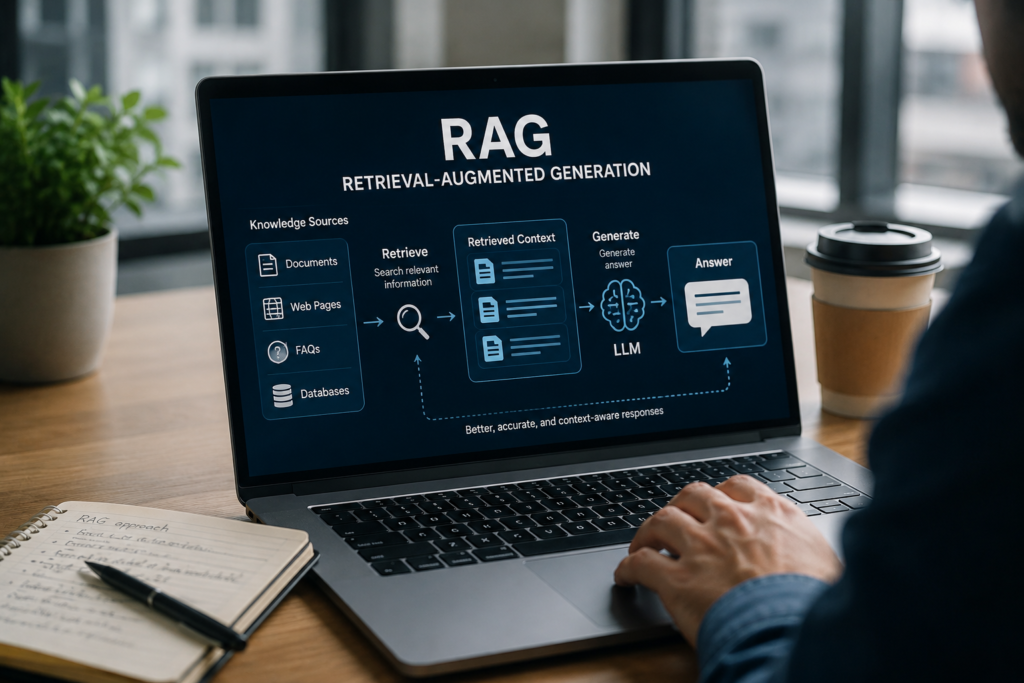
What Is RAG in Simple Terms?
RAG stands for Retrieval-Augmented Generation.
The easiest way to understand it is to imagine giving your chatbot access to a carefully organized company library.
Without RAG:
User Question → LLM → Answer
With RAG:
User Question → Search Company Knowledge → Retrieve Relevant Information → LLM → Grounded Answer
Microsoft describes RAG as a pattern that combines information retrieval with a language model so responses can be grounded in proprietary or frequently changing data.
The model does not need your entire knowledge base placed into every prompt.
Instead, the system searches for the information most relevant to the user’s question and sends only that context to the language model.
The model can then formulate a natural answer based on retrieved information.
That difference is important.
The chatbot is no longer being asked:
“What do you know about this subject?”
It is being told:
“Here is the relevant company information. Use it to answer this specific question.”
A Realistic Example of a Chatbot Without RAG
Suppose an employee asks an internal HR chatbot:
“How many paid personal days can a new employee in our Toronto office take during the first year?”
A general-purpose model may respond:
“Paid personal leave varies by employer and local employment policies. Many Canadian employers provide several personal days each year.”
That answer might be broadly reasonable.
It still does not answer the employee’s question.
Now imagine the chatbot can retrieve the company’s current Canadian Employee Handbook.
It finds a section saying:
Employees in the Toronto office receive three paid personal days during their first twelve months of employment.
The chatbot can now answer:
“Employees in the Toronto office receive three paid personal days during their first twelve months, according to the current Canadian Employee Handbook.”
That is the difference between a conversational model and a useful business knowledge assistant.
How RAG Works Behind the Scenes
The technical architecture can become sophisticated, but the basic process is understandable without being an AI engineer.
Step 1: Your Business Content Is Prepared
The RAG system first needs access to approved sources.
These might include:
- Web pages
- PDFs
- Word documents
- Knowledge base articles
- Product manuals
- Databases
- Internal policies
- FAQs
- Help center content
Large documents are usually divided into smaller sections called chunks.
This matters because the system should retrieve the exact relevant section instead of sending a 200-page document to the language model.
Microsoft’s current RAG documentation specifically identifies content preparation and chunking as important parts of retrieval quality.
Step 2: Content Becomes Searchable
Many RAG systems create embeddings for those chunks.
An embedding represents the meaning of a piece of text numerically.
This allows the system to search by meaning rather than depending only on exact keyword matches.
For example, a user might ask:
“Can I get my money back if I leave early?”
Your policy document might say:
“Early subscription termination is non-refundable.”
A traditional keyword search may struggle because the wording is different.
Semantic or vector search can recognize that the two pieces of language are related.
Modern RAG systems may use:
- Keyword search
- Vector search
- Semantic search
- Hybrid search
Microsoft notes that hybrid retrieval can combine text matching with vector similarity, improving the chances of retrieving relevant information.
Step 3: The User Asks a Question
The chatbot receives the query.
For example:
“Does your Pro plan support SSO?”
Step 4: The System Retrieves Relevant Content
Instead of immediately asking the language model to answer, the retrieval system searches the approved knowledge base.
It might find:
- Pro plan feature documentation
- Authentication documentation
- Pricing details
The most relevant passages are selected.
Step 5: The LLM Receives the Question Plus Evidence
The model now receives something similar to:
User question: Does your Pro plan support SSO?
Retrieved context: Single Sign-On through SAML 2.0 is available on Enterprise plans only.
The model can respond:
“SSO is not included in the Pro plan. SAML 2.0 Single Sign-On is currently available on Enterprise plans.”
The answer is short because the evidence is clear.
RAG Can Reduce Hallucinations, but It Cannot Eliminate Them Automatically
This is an important distinction.
Marketing around RAG sometimes makes it sound as though connecting documents to an LLM immediately solves hallucinations.
It does not.
Microsoft’s own RAG guidance warns that a model can still produce incomplete or inaccurate answers if retrieval returns irrelevant or incomplete information.
A RAG chatbot can fail at two different stages:
Retrieval Failure
The system retrieves the wrong information.
Generation Failure
The system retrieves the correct information, but the model uses it incorrectly.
Good RAG engineering therefore requires attention to both retrieval and generation.
Problem 1: Your Knowledge Base Contains Bad Information
RAG does not make bad data good.
If your knowledge base contains:
- Old pricing
- Duplicate policies
- Contradictory documents
- Outdated procedures
- Poorly written documentation
your chatbot may retrieve them.
Imagine your current refund policy says refunds are available within 14 days.
An old document still says 30 days.
If both are indexed without proper version control, the chatbot may retrieve the wrong one.
This is not fundamentally an LLM problem.
It is a knowledge management problem.
Before implementing RAG, teams should decide:
- Which sources are authoritative?
- Who owns each document?
- How are outdated documents removed?
- How often is content synchronized?
- Which content should never be searchable?
This is why a serious RAG project begins with data, not with the chatbot interface.
Problem 2: Documents Are Chunked Poorly
Chunking sounds like a small technical detail.
It can have a large effect on answer quality.
Suppose a policy says:
Section A: Enterprise customers receive priority support.
Section B: Priority support includes a two-hour response target during business hours.
If the system splits those sections badly, a search for:
“What is the Enterprise support response time?”
might retrieve only Section A.
The model now knows Enterprise customers get priority support, but it does not know what that means.
The resulting answer will be incomplete.
Good chunking tries to keep related ideas together while keeping sections small enough for precise retrieval.
There is no universal chunk size that works for every business.
Legal contracts, product manuals, FAQs and technical documentation may require different strategies.
Problem 3: Your Search Retrieves Similar Content Instead of Correct Content
Similarity is not the same as relevance.
Imagine an electronics retailer has documentation for:
- Model A
- Model A Pro
- Model A Pro 2025
- Model A Enterprise
The documents contain similar language.
A customer asks specifically about Model A Pro 2025.
A weak retrieval system might find documentation for Model A Pro because the text is semantically very similar.
The chatbot then provides a convincing but incorrect answer.
Metadata can help.
Documents might be tagged with:
- Product
- Version
- Region
- Department
- Date
- Customer type
- Language
The retrieval process can then filter before performing semantic search.
This can dramatically narrow the search space.
Problem 4: You Retrieve Too Much Information
More context does not always produce a better answer.
If your RAG system sends the LLM twenty partially relevant passages, the important fact may be buried inside noise.
Microsoft identifies token constraints and relevance selection as key RAG challenges. Retrieval systems should return concise, relevant content rather than dumping entire document collections into the model context.
Good RAG systems therefore rank retrieved content.
The goal is not:
Find everything related to this subject.
The goal is:
Find the smallest amount of trustworthy information required to answer this question correctly.
Problem 5: Your Prompt Allows the Model to Guess
Retrieval can work perfectly and still produce a weak chatbot if the final instructions are poor.
Suppose your system retrieves nothing relevant.
What should the chatbot do?
A badly configured model might generate an answer anyway.
A better system might be instructed:
If the retrieved information does not contain enough evidence to answer the question, say that you cannot confirm the answer and offer escalation to support.
Microsoft’s prompt engineering guidance for RAG recommends explicitly telling models to base responses on retrieved context and defining how they should handle missing or conflicting information.
Sometimes the best AI answer is:
“I don’t have enough verified information to answer that. Let me connect you with someone who can help.”
That response may be less impressive.
It is far more trustworthy.
Problem 6: Your Chatbot Has No Human Escalation Path
Not every customer problem should be handled by AI.
Consider:
- A disputed payment
- A legal complaint
- A complex cancellation
- A highly emotional customer
- A suspected security incident
- A request involving unusual account permissions
The chatbot may gather context and solve routine questions.
At some point, human judgment becomes more valuable than another generated response.
This is why RAG and human review should complement each other.
ZA Technologies explores this issue in Human-in-the-Loop AI Automation: Why Businesses Still Need People in Smart Workflows. The goal is not to force AI to handle every interaction. It is to identify where automation creates value and where people should remain responsible.
RAG vs Fine-Tuning: Which Does Your Chatbot Need?
Businesses often confuse RAG with fine-tuning.
They solve different problems.
RAG
RAG gives a model access to external information at query time.
Use it when your chatbot needs knowledge that is:
- Private
- Frequently updated
- Business-specific
- Document-based
- Too large to include directly in every prompt
Fine-Tuning
Fine-tuning modifies model behavior by training on examples.
It can be useful when you want more consistent:
- Formatting
- Classification
- Tone
- Task behavior
- Response structure
If your chatbot does not know your latest return policy, fine-tuning is usually not the obvious first solution.
The information may change next month.
Updating the knowledge source used by RAG is often easier than retraining a model whenever company facts change.
AWS similarly describes RAG as a way to extend LLMs with organization-specific knowledge without retraining the underlying model.
Some production systems use both techniques.
The choice depends on whether your biggest problem is knowledge, behavior, or both.
What Business Data Can a RAG Chatbot Use?
RAG is not limited to FAQ pages.
A well-designed system can retrieve from many approved sources.
Customer Support
A chatbot may search:
- Help center articles
- Troubleshooting guides
- Product documentation
- Warranty terms
- Return policies
Internal Employee Assistant
It may retrieve:
- HR policies
- SOPs
- Employee handbooks
- IT documentation
- Training resources
Sales Assistant
It may search:
- Product sheets
- Case studies
- Pricing guidance
- Approved sales documentation
- Proposal templates
Technical Support Assistant
It may retrieve:
- API documentation
- Error-code references
- Developer guides
- Release notes
- Troubleshooting procedures
This is why RAG is particularly useful when a business already owns valuable knowledge but employees or customers struggle to find it.
A RAG Chatbot Is Only as Good as Its Retrieval
Businesses often spend most of their attention choosing the language model.
Model selection matters.
But RAG changes the equation.
The question becomes:
Did we retrieve the right evidence?
A smaller model with excellent retrieval can sometimes provide a more useful business answer than a stronger model supplied with irrelevant context.
Microsoft now provides separate evaluation concepts for RAG retrieval quality and final response quality. Its RAG evaluators assess factors such as retrieval relevance, groundedness, response relevance and completeness.
That is a useful way to think about chatbot testing.
When an answer fails, do not simply record:
“The AI got it wrong.”
Ask:
- Was the right document available?
- Did retrieval find it?
- Was the correct chunk selected?
- Did the model receive enough context?
- Did the model follow the context?
- Was the final response complete?
- Should the chatbot have escalated?
Now the problem becomes diagnosable.
How to Test a RAG Chatbot Before Customers Use It
Do not test only with easy questions.
Real users will ask messy ones.
Create a test set covering:
- Direct questions
- Vague questions
- Misspellings
- Follow-up questions
- Questions with wrong assumptions
- Questions involving multiple documents
- Questions with no valid answer
- Conflicting information
- Old product versions
- Sensitive requests
- Edge cases
For each question, define what a good response should contain.
Then evaluate:
Retrieval Accuracy
Did the system retrieve the correct source?
Groundedness
Is the answer supported by retrieved information?
Completeness
Did it include the important details?
Relevance
Did it actually answer the question?
Citation Accuracy
If sources are shown, do they support the answer?
Refusal Behavior
Does the chatbot avoid guessing when the evidence is missing?
Escalation
Does it recognize situations requiring human support?
AI products require a different type of QA from traditional software.
The button may work perfectly while the answer behind it is unreliable.
For a broader look at this problem, see ZA Technologies’ Why Skipping QA Testing Can Cost More Than Development Itself, which includes quality concerns specific to AI-powered products.
Should Every AI Chatbot Use RAG?
No.
Some chatbots do not need proprietary knowledge.
A simple conversational tool that:
- Collects leads
- Books appointments
- Guides users through fixed options
- Routes requests
- Handles structured workflows
may perform perfectly well without a sophisticated RAG architecture.
RAG becomes valuable when answer quality depends on retrieving information that the base model cannot reliably know.
Ask:
Does this chatbot need to answer questions using information specific to our organization?
If yes, RAG deserves serious consideration.
If the task is simply:
“Ask the visitor for their email and preferred meeting time,”
traditional automation may be simpler and cheaper.
Choosing technology because it is fashionable is rarely good product strategy.
Security Matters When RAG Uses Private Business Data
Connecting AI to company knowledge creates another important question:
Who is allowed to retrieve what?
An HR employee should not automatically have access to executive compensation documents.
A customer should not retrieve another customer’s account information.
A contractor should not search confidential internal strategy documents simply because everything exists in the same vector database.
Modern enterprise RAG architecture must consider permissions during retrieval.
Microsoft identifies access control and governance as core RAG challenges, particularly when proprietary information is made available to AI applications.
Security should therefore be designed into the retrieval layer, not added after launch.
Consider:
- User authentication
- Role-based access
- Document permissions
- Tenant isolation
- Sensitive-data filtering
- Audit logs
- Data retention
- Source-level security
A chatbot that gives accurate answers but leaks confidential information is not a successful AI product.
How Better RAG Improves Customer Experience
When implemented properly, RAG changes the experience from generic conversation to useful assistance.
Instead of:
“Please check our documentation.”
the customer receives:
“Yes. Your current Business plan includes up to 25 team members. Additional seats can be added from the Billing section.”
Instead of:
“Shipping times vary.”
the chatbot can say:
“Orders to Ontario currently ship within 2 to 4 business days according to our Canadian shipping policy.”
Instead of:
“Contact technical support.”
the chatbot can retrieve the relevant troubleshooting steps and walk the user through them.
The AI becomes useful because it has access to the same trusted knowledge your team uses.
RAG Can Also Improve Internal AI Assistants
Customer-facing chatbots receive most of the attention, but internal RAG systems can be equally valuable.
Consider a new employee trying to answer:
“How do I request access to the staging environment?”
They could:
- Message a colleague.
- Search Slack.
- Look through several internal documents.
- Open IT tickets.
Or they could ask an internal assistant that searches approved company documentation and returns the relevant process with a source.
The value is not that the AI “knows everything.”
The value is that the organization’s knowledge becomes easier to access.
How Agentic Retrieval Is Changing RAG
Basic RAG often sends one search query to a knowledge index.
That works well for straightforward questions.
Complex questions can require more.
Consider:
“Compare our Enterprise and Professional plans for a 150-person company that needs SSO, audit logs and Canadian data residency.”
That question contains several separate requirements.
Modern retrieval systems are increasingly capable of breaking complex questions into smaller searches.
Microsoft’s agentic retrieval architecture can decompose complex queries into focused subqueries, run them in parallel and combine relevant information before response generation.
The architecture is becoming more sophisticated.
But the principle remains the same:
Find trustworthy evidence before generating the answer.
How to Decide Whether Your Chatbot Needs RAG
Ask these questions.
Does the chatbot frequently give generic answers?
If yes, it may lack business-specific context.
Does your information change often?
Pricing, inventory, policies and product documentation are difficult to handle reliably through static model knowledge alone.
Is important knowledge spread across many documents?
RAG can provide a conversational layer over approved business content.
Do users need precise answers?
The higher the cost of incorrect answers, the more important grounding and verification become.
Do you need sources or citations?
RAG can preserve source metadata so the application can show where information came from.
Is your chatbot currently relying mainly on prompt engineering?
Better prompts can improve behavior, but prompts cannot provide information the system simply does not have.
If several answers are yes, the problem may not be that your chatbot needs a “better prompt.”
It may need a proper retrieval layer.
What a Strong RAG Implementation Should Include
A production-ready RAG chatbot usually needs more than a vector database.
A serious implementation should think about:
- Authoritative knowledge sources
- Document cleaning
- Content chunking
- Embedding strategy
- Metadata
- Keyword and vector retrieval
- Semantic ranking
- Access controls
- Prompt design
- Source citations
- Human escalation
- Monitoring
- Evaluation datasets
- Feedback collection
- Content updates
- Cost and latency
This is why RAG should be treated as a system, not a plugin.
ZA Technologies’ RAG / LLM Integration service focuses on connecting language models with structured and unstructured business data so AI applications can generate more context-aware responses.
For businesses specifically building conversational systems, the AI Chatbots & Agents service covers customer support assistants, internal assistants, integrations and production chatbot workflows.
Final Thoughts
Your chatbot may not be giving weak answers because the language model is too small.
It may be answering without the information required to do its job.
That is the core problem RAG tries to solve.
Instead of expecting an LLM to remember your company, RAG allows the application to retrieve relevant information from trusted sources when a question is asked.
That can improve:
- Accuracy
- Relevance
- Business context
- Knowledge freshness
- Source transparency
- User trust
But implementation quality matters.
Poor documents, weak retrieval, bad chunking, missing permissions or careless prompts can still produce unreliable results.
The strongest RAG systems therefore combine good data, thoughtful retrieval, clear model instructions, rigorous testing and appropriate human oversight.
A chatbot should not merely sound confident.
It should know when it has evidence.
And when it does not.
If your AI chatbot sounds intelligent but still gives generic, outdated or unreliable answers, the problem may be in its knowledge architecture. ZA Technologies can help design RAG and LLM integrations that connect your chatbot to trusted business data and turn generic conversations into useful, grounded answers.


