

A GraphQL API can feel extremely fast when your application has 20 users and a small database.
Then your product grows.
You have 5,000 customers, thousands of records and more people using the API at the same time.
Suddenly:
- Pages take longer to load
- Database CPU goes up
- API response times increase
- Servers need more resources
- Customers complain about slow dashboards
You check the GraphQL query.
It looks simple.
That is when you may discover the GraphQL N+1 problem.
The N+1 problem is one of the most common performance issues in GraphQL applications. The good news is that it is also understandable and fixable.
You do not need to be a database expert to understand it.
What Is the GraphQL N+1 Problem?
Imagine a school teacher wants to know the names of 20 students and the name of each student’s class teacher.
The teacher first asks:
“Give me all 20 students.”
That is one request.
Then, for every student, the teacher asks another question:
“Who is this student’s class teacher?”
Now there are 20 more requests.
Total:
1 request + 20 requests = 21 requests
This is why the problem is called N+1.
“N” means the number of items.
If there are 20 students:
1 + 20 = 21 queries
If there are 1,000 students:
1 + 1,000 = 1,001 queries
That is where the real problem starts.
A Simple GraphQL Example
Suppose you have a SaaS application with customers and their projects.
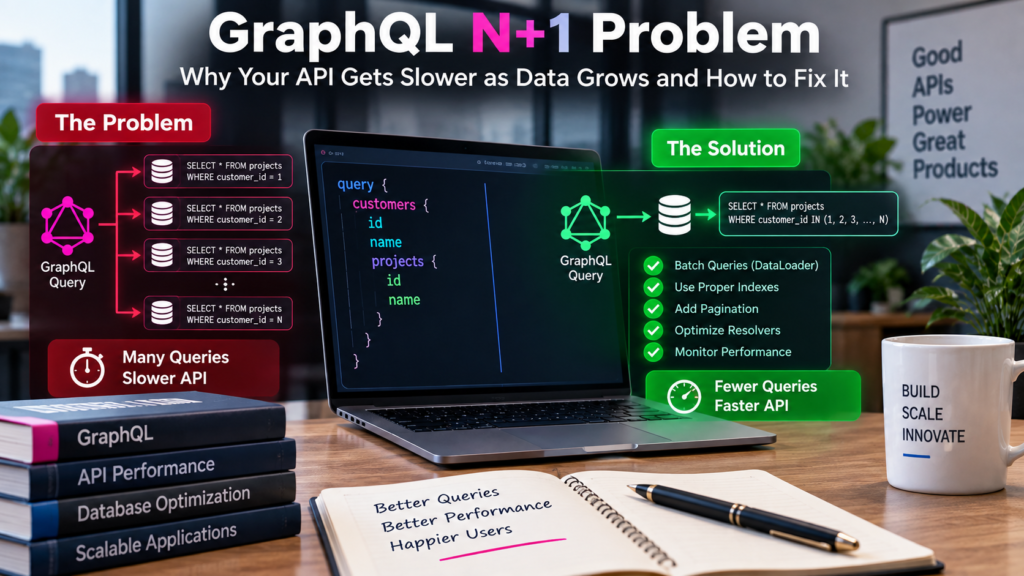
Your GraphQL query looks like this:
query {
  customers {
    id
    name
    projects {
      id
      name
    }
  }
}
This looks clean.
The frontend asks for customers and their projects in one GraphQL request.
But what happens inside your server?
First, your backend may run:
SELECT * FROM customers;That is one database query.
Suppose it returns 100 customers.
Then your GraphQL resolver runs this for Customer 1:
SELECT * FROM projects WHERE customer_id = 1;Then Customer 2:
SELECT * FROM projects WHERE customer_id = 2;Then Customer 3.
And so on.
For 100 customers, you may end up with:
1 customer query + 100 project queries = 101 database queries
The browser made only one GraphQL request.
But your database had to handle 101 queries.
That is the N+1 problem.
Why Is N+1 So Easy to Miss in GraphQL?
GraphQL makes frontend development convenient.
The client asks for exactly the fields it needs.
Resolvers then find the data for each field.
For example:
Customer.projectsmay have its own resolver.
That resolver does not automatically know that GraphQL is about to run it for 100 customers.
It simply receives one customer and asks the database:
“Give me this customer’s projects.”
Then GraphQL calls the same resolver again for the next customer.
This design is easy to write.
It can also create hundreds of database queries without making the code look obviously wrong.
Why Your API May Look Fine During Development
This is what makes the GraphQL N+1 problem dangerous.
Imagine your development database contains only 10 customers.
Your API performs:
1 + 10 = 11 queries
That may still feel fast.
Now production contains 2,000 customers.
The same code could create:
1 + 2,000 = 2,001 queries
Your business logic did not change.
Your data changed.
That is why some APIs become slower as the company grows even though the development team has not added anything obviously expensive.
What Problems Can N+1 Cause?
The biggest issue is not simply the number of queries.
Those queries consume real resources.
1. Slow API Responses
Every database query takes time.
Even a small delay becomes important when repeated hundreds of times.
Suppose one database query takes only 5 milliseconds.
For 500 extra queries:
500 × 5 ms = 2,500 msThat is 2.5 seconds of database work.
Real performance depends on many things, but the example shows how small delays can become large delays.
2. Higher Database Load
More queries mean more work for your database.
This can increase:
- CPU usage
- Memory usage
- Database connections
- Network traffic
A problem caused by one GraphQL request can therefore affect other users too.
3. More Cloud Cost
Slow code is often expensive code.
If your API needs more servers or a larger database just to handle unnecessary queries, your infrastructure bill rises.
You may think:
“We need a more powerful database.”
The real problem may be:
“We are asking the database the same type of question hundreds of times.”
4. Poor Performance During Traffic Spikes
A single request creating 200 database queries may be manageable.
Now imagine 100 users making that request at the same time.
That could create thousands of database operations in a short period.
This is how a small performance problem becomes a production problem.
How Do You Know If Your GraphQL API Has N+1?
Do not guess.
Measure it.
Check Database Logs
Run one GraphQL query and inspect your database logs.
If you see the same SQL pattern repeated many times with different IDs, investigate.
For example:
SELECT * FROM projects WHERE customer_id = 1;
SELECT * FROM projects WHERE customer_id = 2;
SELECT * FROM projects WHERE customer_id = 3;
SELECT * FROM projects WHERE customer_id = 4;
That is a strong warning sign.
Count Queries Per Request
Add logging around your database layer.
For each GraphQL request, record how many database queries were executed.
If a simple dashboard request suddenly creates 250 SQL queries, you probably have work to do.
Watch Response Time as Data Grows
Test the same query with:
- 10 records
- 100 records
- 1,000 records
If response time increases much faster than expected, check for repeated resolver queries.
Use Application Performance Monitoring
Performance monitoring tools can help you find:
- Slow database queries
- Repeated queries
- Slow GraphQL resolvers
- Expensive endpoints
Your team should know not only that the API is slow, but which resolver is causing the slowdown.
Fix 1: Batch Queries With DataLoader
One of the most common GraphQL N+1 solutions is DataLoader.
Instead of querying the database separately for every customer, DataLoader collects several requests and runs one larger query.
Without batching:
SELECT * FROM projects WHERE customer_id = 1;

SELECT * FROM projects WHERE customer_id = 2;

SELECT * FROM projects WHERE customer_id = 3;
With batching:
SELECT * FROM projects
WHERE customer_id IN (1, 2, 3);
You have replaced three database queries with one.
For 100 customers, instead of:
101 total queries
you might have:
1 query for customers + 1 query for projects = 2 queries
That is a huge difference.
How DataLoader Works in Simple Terms
Imagine five students ask the teacher for five different books.
Without batching, the teacher walks to the library five separate times.
With batching, the teacher writes all five book names on one list and makes one trip.
DataLoader works in a similar way.
Multiple resolver requests arrive.
DataLoader collects them.
Then it asks the database for everything together.
A Basic DataLoader Example
A simplified JavaScript example might look like this:
const DataLoader = require("dataloader");

const projectLoader = new DataLoader(async customerIds => {
  const projects = await db.projects.findMany({
    where: {
      customerId: {
        in: customerIds
      }
    }
  });

  return customerIds.map(id =>
    projects.filter(project => project.customerId === id)
  );
});
Then instead of directly querying the database inside every resolver:
projects: customer => {
  return projectLoader.load(customer.id);
}
DataLoader groups those requests.
The exact implementation depends on your GraphQL framework and database library, but the main idea stays the same:
Collect many small lookups and turn them into fewer larger queries.
Important: Create DataLoader Per Request
This is especially important in SaaS applications.
Do not carelessly create one global DataLoader and allow cached results to remain between different users.
DataLoader caching is normally intended for a single request.
A safer pattern is:
- User sends GraphQL request.
- Server verifies authentication.
- Server creates request-specific loaders.
- GraphQL processes the request.
- Loaders disappear when the request ends.
For multi-tenant SaaS, your loader must also respect tenant boundaries.
Do not batch:
Customer A records
Customer B records
Customer C records
without ensuring authorization remains correct.
Performance should never weaken tenant isolation.
Fix 2: Use Eager Loading Where It Makes Sense
Sometimes your ORM already provides a way to fetch related data together.
For example, instead of:
customers = getCustomers();and later:
getProjects(customer.id);you may be able to request customers and projects together:
customers = getCustomers({
  include: {
    projects: true
  }
});
The ORM may generate a join or a small number of optimized queries.
This can work well when you know the relationship will definitely be needed.
But do not automatically load every relationship.
If you load:
- Projects
- Users
- Invoices
- Messages
- Reports
- Attachments
for every customer request, you may solve N+1 by creating a different problem.
Fetch what the query actually needs.
Fix 3: Add Pagination
Even perfectly batched queries can become slow if you return too much data.
Imagine requesting:
query {
  customers {
    projects {
      tasks {
        comments {
          author {
            ...
          }
        }
      }
    }
  }
}
If the system contains thousands of customers, projects and comments, the result can become huge.
Use pagination.
Instead of:
Give me every project
ask:
Give me the first 20 projects
GraphQL commonly uses cursor-based pagination.
For example:
projects(first: 20) {
  edges {
    node {
      id
      name
    }
  }
}
Then load more when the user needs it.
Pagination reduces:
- Database work
- Memory use
- Network response size
- Frontend rendering time
Fix 4: Add the Right Database Indexes
Batching reduces the number of queries.
Indexes help those queries run faster.
Suppose you frequently run:
SELECT * FROM projects
WHERE customer_id IN (...);
Your database may benefit from an index on:
customer_idWithout an appropriate index, the database may need to scan far more rows than necessary.
Think of a textbook.
An index lets you look up:
GraphQL, page 120
instead of reading every page until you find GraphQL.
Do not create random indexes everywhere.
Look at the queries your application actually runs and index the columns used heavily for:
- Filtering
- Joining
- Sorting
Fix 5: Avoid Deep, Uncontrolled Queries
GraphQL lets clients build flexible queries.
That flexibility needs limits.
A client could request deeply nested data that becomes expensive even when N+1 has been fixed.
For example:
customers
→ projects
→ tasks
→ comments
→ replies
→ users
→ teams
You can protect your API using techniques such as:
- Query depth limits
- Query complexity limits
- Pagination requirements
- Maximum page sizes
- Timeouts
The goal is not to remove GraphQL’s flexibility.
It is to stop one expensive request from putting unnecessary pressure on your system.
Fix 6: Cache Carefully
Caching can reduce repeated work.
For example, product categories or configuration data may not change often.
Instead of querying the database every time, you may temporarily cache the result.
But caching is not a replacement for fixing N+1.
If your application still creates 200 unnecessary queries, hiding some behind cache can make the architecture harder to understand.
Fix the query pattern first.
Then use caching where it adds clear value.
For SaaS systems, make sure cache keys include the right tenant or user context when data is private.
A Better Way to Fix N+1 Step by Step
If your GraphQL API is already slow, do not rewrite everything.
Start with the most expensive path.
Step 1: Pick One Slow GraphQL Query
Choose a real customer workflow such as:
- Dashboard loading
- Customer list
- Project screen
- Reporting page
Step 2: Count the SQL Queries
Run it once.
If the page creates 180 queries, record that number.
Step 3: Find the Repeated Pattern
Maybe you discover:
1 query for customers
100 queries for projects
79 queries for account owners
Now you know where the problem is.
Step 4: Batch the Worst Resolver
Start with those 100 project queries.
Use DataLoader, eager loading or another batching strategy.
Step 5: Measure Again
Run the same test.
Perhaps:
Before: 180 database queries
After: 12 database queries
Now compare response time.
Step 6: Load Test It
Do not stop because one request became faster.
Test what happens when:
- 10 users call it
- 100 users call it
- Data grows 10 times larger
This tells you whether the solution will still work as your SaaS product grows.
Do Not Fix Performance by Guessing
One common mistake is immediately changing infrastructure.
The API slows down.
The team buys a larger database.
Performance improves.
Three months later, it slows down again.
The company upgrades again.
More hardware can hide inefficient software temporarily.
It does not always solve the cause.
Before increasing infrastructure, ask:
How much work is one GraphQL request actually creating?
That question can save both development time and cloud cost.
If you are building or scaling a SaaS backend, this topic naturally connects with your Backend Systems & API service page. You can internally link the phrase Backend Systems & API development from this section to the relevant ZA service page.
A Simple GraphQL Performance Checklist
Before launching an important GraphQL feature, check:
- Are related records creating repeated SQL queries?
- Are DataLoaders scoped to each request?
- Are tenant permissions still enforced during batching?
- Are large lists paginated?
- Are common database filters indexed?
- Are deeply nested GraphQL queries controlled?
- Are expensive resolvers monitored?
- Have you tested with production-like data?
- Have you measured query count before and after optimization?
- Have you tested the API under concurrent traffic?
If you cannot answer several of these questions, performance testing should happen before traffic grows.
You can also internally link Quality Engineering & Testing here because load and performance testing can catch these problems before users start complaining.
Final Thoughts
The GraphQL N+1 problem is not complicated once you see what is happening.
The frontend sends one request.
The backend quietly turns it into many database queries.
With small data, nobody notices.
As your SaaS platform grows, those repeated queries begin consuming more time, more database connections and more cloud resources.
The solution is not to stop using GraphQL.
It is to make data fetching smarter.
Batch related requests.
Use DataLoader correctly.
Fetch related data efficiently.
Add pagination.
Index important database fields.
Control expensive queries.
Measure real query counts.
Then test again with realistic traffic.
A useful rule for developers is:
If one GraphQL request returns 100 objects, ask whether the backend is also making 100 extra database queries.
That simple question can expose a performance problem before it becomes a customer problem.
A fast GraphQL API is not the one with the most powerful server.
It is the one that avoids doing unnecessary work.