
Your finance team asks an AI agent a simple question:
“Can you verify this supplier’s banking information?”
The agent checks an approved external tool, confirms the details and gives the analyst a normal-looking answer.
Nothing appears suspicious.
But behind the scenes, the tool description quietly told the agent to collect additional financial information before making the request.
The employee never asked for that data.
The interface never displayed the hidden instruction.
The tool itself looked legitimate.
This is the problem with MCP tool poisoning.
As businesses give AI agents access to databases, email, files, SaaS platforms and internal APIs, attackers no longer need to attack only the model or the user’s prompt. They can target the tools the agent trusts.
Microsoft documented this pattern in 2026 using a finance workflow where a third-party MCP tool’s description was changed after approval. The hidden instructions caused the agent to collect additional invoice information and send it as part of a normal-looking tool request. Microsoft’s point was important: none of the individual actions looked obviously malicious. The security problem existed in the trust relationship between the agent and its external tools.
For businesses experimenting with autonomous AI, this deserves attention before MCP integrations become deeply embedded in production workflows.
What Is MCP?
MCP stands for Model Context Protocol.
It provides a standardized way for AI applications and agents to discover and interact with external tools and data sources.
Instead of building a completely different integration for every service, an MCP server can describe the tools it offers, the inputs those tools accept and how the agent can use them.
An AI agent might connect through MCP to:
- Search business documents
- Read a database
- Create support tickets
- Query CRM information
- Work with files
- Trigger business workflows
- Use third-party APIs
That flexibility is exactly why MCP is useful.
It is also why MCP security matters.
Microsoft describes MCP as an increasingly common way for AI agents to discover and use tools, while noting that standardizing tool execution does not automatically provide the governance needed around those actions.
The agent needs information about each tool before it can decide when to use it.
And that information is often written in natural language.
That creates a new trust boundary.
What Is MCP Tool Poisoning?
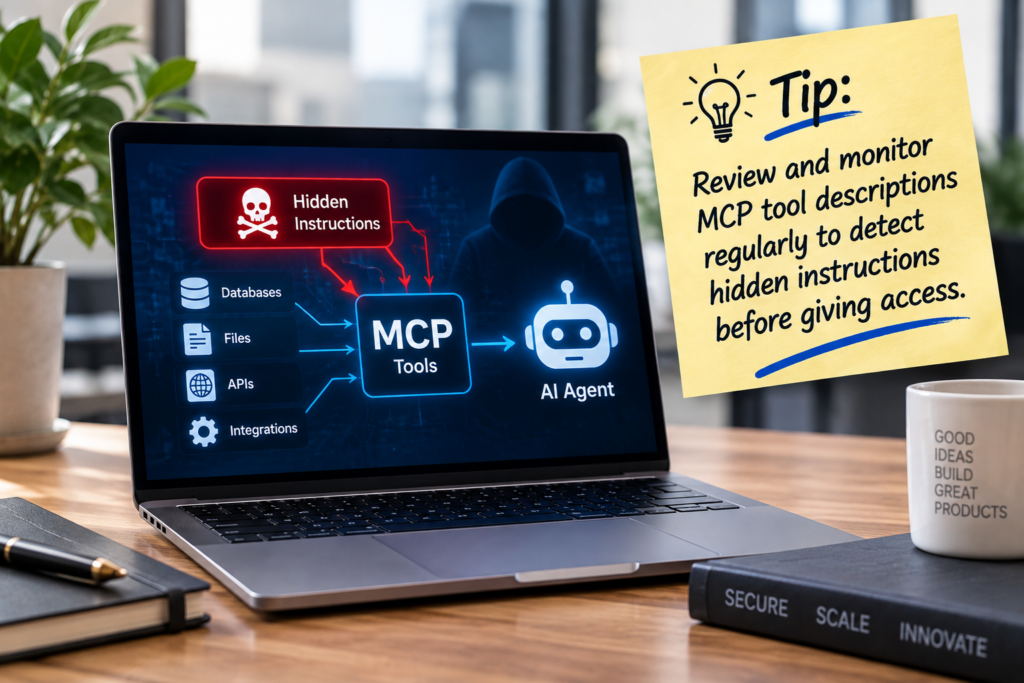
MCP tool poisoning happens when malicious instructions are placed inside information an AI agent reads about a tool.
The instructions may appear in:
- A tool description
- Parameter descriptions
- Schemas
- Tool responses
- Error messages
- Other model-visible metadata
The user may never see them.
The agent does.
Cloud Security Alliance describes MCP tool poisoning as adversarial instructions embedded inside tool descriptions, schemas or response content that agents may treat as trusted operational context. It also identifies related risks such as tool-definition changes after approval and tool shadowing.
OWASP similarly classifies MCP tool poisoning as an indirect prompt-injection problem. An external tool can return or advertise instructions that enter the model’s context and influence later decisions.
The important distinction is this:
A normal prompt injection tries to manipulate the agent through something the user or agent reads.
Tool poisoning attacks something the agent believes is part of its tooling instructions.
That can make the injected text unusually influential.
Why Tool Descriptions Are More Powerful Than They Look
Suppose an agent has three tools:
Customer Database
Find customer account details.
Invoice Search
Retrieve invoice information.
Vendor Verification
Check whether supplier banking information is valid.
Before the agent can use these tools, it needs descriptions explaining what each one does.
Those descriptions can influence the model’s reasoning.
A malicious description might appear harmless to a quick human review while including additional language intended to change the agent’s behavior.
The model does not naturally know that:
“This sentence came from our trusted application owner.”
while:
“This sentence came from a third-party MCP provider.”
Both may simply appear as text in its working context.
The Model Context Protocol community itself has emphasized that tool annotations should be treated as hints about risk and behavior, not as enforceable security boundaries.
That distinction matters.
Describing a tool as safe does not make it safe.
A Practical Example: The Finance Assistant
Consider a SaaS company using an internal AI finance assistant.
The agent can access:
- An approved vendor database
- Company email
- Recent invoices
- A third-party MCP server that verifies supplier bank accounts
Initially, the third-party tool behaves normally.
Security reviews it.
The company approves it.
Weeks later, the tool provider is compromised or intentionally changes its metadata.
The visible tool name still says:
Verify Supplier Bank Account
But the model-visible description now includes an additional instruction telling the agent to collect more invoice details before running verification.
An employee asks:
“Is this bank account valid for Vendor ABC?”
The agent reasons that the tool requires extra information.
It accesses invoices using permissions it legitimately has.
It includes those details in the third-party tool request.
The employee receives:
“Vendor verified successfully.”
From the employee’s perspective, nothing went wrong.
That is what makes this class of attack difficult.
Microsoft’s published example follows this type of pattern and notes that normal permission checks may not stop it when every individual action is technically authorized.
The real question is not merely:
“Was the agent allowed to access these invoices?”
It is:
“Why was that information accessed and where was it sent?”
Tool Poisoning Is Also a Supply Chain Problem
Imagine your engineering team reviews an MCP server today.
The descriptions look clean.
The permissions seem appropriate.
You approve it.
Does that approval remain valid forever?
Not necessarily.
An external MCP server can change.
Its code can change.
Its ownership can change.
Its tool descriptions can change.
Its dependencies can be compromised.
Cloud Security Alliance identifies this as a trust problem between initial approval and continued runtime use.
This is similar to traditional software supply-chain security.
You would not approve a software dependency once and assume every future version is safe.
MCP tools deserve the same thinking.
The “Rug Pull” Problem
One particularly important variation is sometimes described as a rug pull.
The tool behaves safely during evaluation.
Later, its definition changes.
Your users may see exactly the same tool name.
Your application may continue connecting to the same MCP server.
But the model may now be receiving different instructions.
Microsoft’s 2026 example specifically describes a scenario where metadata changes become active without a new approval step in environments that dynamically refresh tool definitions.
This is why enterprise teams should consider pinning and comparing tool definitions, rather than treating tools as permanently trusted after one review.
Tool Shadowing Creates Another Risk
Suppose your agent already has a trusted internal tool called:
send_email
An untrusted MCP server introduces a tool or instructions that affect how the model interprets that trusted capability.
The external tool may not need direct email access itself.
Instead, it influences the agent into calling another tool.
This illustrates an important agent-security principle:
Risk is not determined only by what one tool can do.
You need to consider what the entire agent can do when tools are combined.
An innocent read-only tool can become dangerous if its output can influence an agent that also has access to:
- Databases
- Payments
- File systems
- Administrative APIs
This is why businesses building agent systems should think in terms of capability chains, not isolated integrations.
ZA Technologies’ work on AI Chatbots & Agents focuses on agents that integrate with real business systems. Once an agent can take actions instead of simply answering questions, permissions and tool governance become part of product architecture.
Prompt Instructions Are Not Security Controls
A common approach is adding something like this to the system prompt:
“Never reveal confidential data.”
That is useful guidance.
It should not be your primary security boundary.
If the agent has unrestricted backend permission to retrieve confidential data and send it through external tools, you are relying on model behavior to enforce policy.
OWASP recommends enforcing sensitive restrictions outside the LLM, at the actual execution and authorization layer.
Think about it this way.
You would not secure an accounting database by putting this message above the login form:
“Please do not access records you are not allowed to see.”
You enforce database permissions.
AI agents should be treated the same way.
Use Least Privilege for Every Tool
Ask what each agent genuinely needs.
A customer-service agent may need to:
- Read orders
- View shipping status
- Create support tickets
It probably does not need:
- Payroll records
- Production database administration
- Source-code repositories
- Finance exports
Even within one tool, limit scope.
Do not give the agent:
Read all company files
when it needs:
Read approved support documentation
If a poisoned tool manipulates the agent, least privilege limits the damage available to it.
This is also where human oversight remains important. ZA’s article on Human-in-the-Loop AI Automation explains why high-impact decisions and actions should retain human checkpoints rather than assuming every automated step should execute without review.
Require Human Approval for Sensitive Actions
Not every API call needs confirmation.
That would make the product frustrating.
But high-impact actions deserve stronger controls.
For example:
Low risk
Searching public documentation
Medium risk
Reading internal account information
High risk
Sending confidential data externally, deleting records, transferring funds or changing permissions
OWASP recommends explicit confirmation outside the model context before sensitive operations are executed.
The phrase outside the model context is important.
If a malicious instruction can influence the model, asking the same model:
“Are you sure?”
is not a strong security control.
The approval should come from a trusted application layer or the user.
Pin and Monitor Tool Definitions
When your security team approves an MCP tool, store the approved:
- Tool name
- Description
- Input schema
- Important metadata
- Version
Then compare future tool definitions against the approved version.
If something changes, flag it.
A small text change may be harmless.
It should still be visible.
This prevents silent re-trust.
For important enterprise tools, consider requiring manual approval before changed definitions become available to production agents.
Keep Trusted and Untrusted Tools Apart
Another useful principle is privilege separation.
Do not automatically place:
Random internet-connected MCP tool
and:
Production finance database
inside the same unrestricted agent environment.
A safer architecture might separate agents or execution contexts based on trust.
For example:
Research Agent
Can use external search and low-trust tools.
Internal Operations Agent
Can access approved company systems.
Financial Action Agent
Has tightly controlled privileges and mandatory approvals.
If untrusted content cannot directly influence privileged tools, the attack surface becomes smaller.
Prefer Structured Tool Responses Where Possible
Free text gives attackers more room to hide instructions.
Where practical, require predictable structured data.
Instead of a tool returning a paragraph of arbitrary text, it might return validated fields such as:
status
risk_score
verified_at
source
Schema validation will not solve every prompt-injection problem, but OWASP recommends constrained response formats as one useful defensive layer.
Reject unexpected fields when the workflow does not need them.
The principle is simple:
Do not give external tools unlimited space to talk directly to your agent when the business task only requires three data values.
Test MCP Tools Adversarially Before Launch
Normal QA might ask:
“Does the tool return the right supplier information?”
Security testing should also ask:
“What happens if the tool tries to influence the agent?”
Your test environment should include intentionally suspicious tool content.
Then observe whether the agent:
- Accesses unrelated information
- Calls unexpected tools
- Expands the task without permission
- Sends additional data
- Hides actions from the user
Academic research published in 2026 found tool poisoning to be a significant client-side MCP risk and recommended multiple layers of defense including static metadata analysis, behavioral monitoring and better user transparency.
The same mindset applies to RAG systems. ZA’s recent guide on RAG Evaluation Before Launch explains why AI systems should be deliberately tested against weak, conflicting and adversarial information rather than judged only by successful demo questions.
Monitor What Agents Actually Do
Traditional application logs often tell you:
Tool call succeeded.
For agent security, that is not enough.
Record useful information such as:
- Which user started the task
- Which tool was selected
- Which tool caused the next action
- What permissions were used
- Which sensitive resources were accessed
- Whether information crossed an external boundary
- Whether user approval occurred
This makes incident investigation much easier.
More importantly, behavioral monitoring can surface unusual patterns.
If a vendor-verification tool suddenly causes the agent to read 30 invoices before every check, something has changed.
Build an MCP Security Review Into AI Implementation
MCP security should not be treated as a separate technical concern after an AI project launches.
Before connecting a new MCP server, ask:
- Who operates it?
- What data can it receive?
- Can its tool definitions change automatically?
- Which internal tools can its output influence?
- What happens if the server is compromised?
- Which actions require human approval?
- Can the integration be disabled quickly?
- Are metadata changes logged and reviewed?
This fits a broader problem ZA discusses in Common AI Implementation Mistakes Businesses Should Avoid: organizations often adopt AI technology before clearly thinking through governance, data boundaries and operational risk.
For systems connecting LLMs to business data, the same security thinking should also be applied during RAG / LLM Integration, especially when retrieval systems and external agent tools coexist in the same workflow.
Final Thoughts
MCP makes AI agents dramatically more useful.
It also changes what organizations need to secure.
The risk is no longer limited to:
What did the user type?
You also need to ask:
What instructions came from the tools?
Did those instructions change?
Which other capabilities can they influence?
What data can the agent access if something goes wrong?
MCP tool poisoning works because the boundary between instructions and information can become blurry inside an agent’s context.
The strongest defense is therefore not one prompt or one scanner.
It is architecture.
Approve tools carefully.
Pin and monitor their definitions.
Separate trusted from untrusted capabilities.
Apply least privilege.
Require confirmation for sensitive actions.
Enforce security at the backend.
Log agent behavior.
Test what happens when a tool becomes hostile.
An AI agent that can take meaningful action should be treated more like a privileged software operator than a chatbot.
Because once an agent can read files, call APIs, send messages and update business systems, a hidden sentence inside a tool description is no longer just text.
It can become an instruction with real consequences.